Notice - Blog Ini Dibuat Tanggal 21 Juli 2013
Halo Sobat!, Members Area : Daftar - Masuk · Pasang Iklan · Peta Situs
Diberdayakan oleh Blogger.

Arsip Blog

Tampilkan postingan dengan label Nokia Software. Tampilkan semua postingan

Download X-plore v1.60 S60v3v5 S^3 Anna Belle Signed+Unsigned [Full Version]

Written By Unknown on Rabu, 26 Juni 2013 | 04.39

X-plore v1.60 S60v3v5 S^3 Anna Belle Signed+Unsigned

X-plore v1.60 S60v3v5 S^3 Anna Belle Signed+Unsigned

 Supported Language: English
Downloading Mirrors: Tusfile.net Easy Download
Must Read The Full Post Before Download & Install


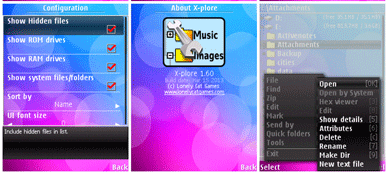
LCG X-plore v1.60(0) S60v3 S60v5 S^3 Anna Belle (Released as freeware). The X-plore is a file manager for mobile phones, with wide range of functions on the file system of your mobile device. X-plore allows you to see inside of your Android phone or tablet.

Dual-pane tree view: X-plore is a dual-pane explorer, which means that there're two folders shown at same time, and common operation such as copying files are done from one pane to another. And X-plore shows folder hierarchy in a tree view. This offers clear orientation on where in file system you currently are, and fast switching to other location. Currently selected folder and files are highlighted, while other folders/files have slightly darker background.

Root access: You may explore internals of the device, and if you're power user and have your device rooted, you can make changes to system data - backup files, remove unwanted applications, etc. Be aware that this possibility can make your device unoperational, requiring reinstall of firmware, but if you've rooted your device, you probably know what you're doing. If you're standard user, you may choose to hide internal memory from view and be sure not to mess with system. You can comfortably see contents of your external memories, either be it built-in high capacity memory, external memory card, or possibly USB memory stick attached to your tablet. All these memory types are listed in main level, you don't need to search for their folders on the device. Where it makes sense, X-plore tries to tell more about the file. This means showing thumbnails for images and video, and displaying basic media information about music files.
Download X-plore v1.60 S60v3v5 S^3 Anna Belle Signed+Unsigned [Full Version]

FTP and FTPS servers: Access to FTP and FTPS (secure FTP) a server is supported. Multiple servers may be configured. All standard file operations can be done on FTP server.

LAN servers: X-plore can display shared folders on other computers in LAN (local area network). The system is also called SMB or Microsoft Windows Network, and can access shared folders on computers connected to LAN, or even remote server if it supports SMB protocol. X-plore can search for available servers, edit and save settings, or manually add server. It's also possible to omit username or password (for security reason) and enter these on demand during connecting to server.

Cloud storage: X-plore can access various web storage servers, and access their files. You need to have account in supported web cloud service, then you can access your files stored online through X-plore.

Picasa albums: X-plore can list images in Picasa albums, download them, create albums, upload and delete photos, edit captions. Picasa web albums are natural choice of image albums on Android, since they're easily accessible with user's Google account already configured on Android device.

Download X-plore v1.60 S60v3v5 S^3 Anna Belle Signed+Unsigned [Full Version]

Operations on files: Main operations are related to managing files and folders - viewing, copying, moving, deleting, compressing to Zip, extracting, renaming, sharing, and more. Main interaction is done by touch screen, clicking on folders or files to open files, or long-click to open context menu which contains options which can be done on particular clicked item, or multiple selected items. Multi-selection allows to do operation on more files at once. Files can be selected by clicking check box. It is also possible to select all files in a folder, or clear selection, by clicking parent folder's check box. Opening file may mean to use one of built-in viewer for most popular file types: images, audio, video and text. Or you may configure X-plore to use system application for opening files, in which case system-predefined application that can open particular file is launched. If there're more such applications, Android shows dialog allowing to choose application for opening the file. X-plore indicates that multiple applications may open the file by displaying small question mark on file's icon. When this is shown, you may expect system dialog for picking application to open the file. Sometimes one application becomes default application for particular file type (for example to listen to mp3). This is Android system feature. However, it may be confusing for user to remove this application to handle opening of given file type. Here X-plore helps by offering menu option to clear the default application handling.

Archives: Archives (currently supported are Zip and Rar) are displayed as other folders. You may open them, see contents, and do standard operations that you'd do on files - rename, delete, copy from/to, etc. You don't feel other difference from normal file system, other than operation may be slower for larger Zip files due to need of recompression. Note: RAR archives support only read-only operations.

SQLite database viewer: X-plore can show SQLite database files (those with .db extension) as expandable list of tables, each table containing list of rows and columns with database entries. The view is read-only, no changes to database are done. This feature can aid to developers to check content of their databases, or allows to curious ones to explore system databases (which works on rooted devices).

Interaction: Additional interaction is possible by button bar, which is between two panes, and is fully configurable. You may put buttons of your desired operations here, and change ordering. Buttons in this bar become enabled or disabled automatically depending on if it is possible to perform given operation. Some operations have different meaning for long-click on button. You may learn what happens for long click in the Button configuration dialog. For example, for Copy operation, normal click initiates copying, and long click initiates moving of files.

Another input comes from configurable keyboard shortcuts. Many android devices are mainly controlled by touch screens, and have minimal buttons or keys. Even on such device, you may assign action to volume keys. And on devices with full hardware keyboard, many operations may be (and are by default) assigned to various keys.

Licensing information: X-plore for Android is offered for free Application must be installed from Android Market, otherwise it won't work; link to Download is on the left bar Lonely Cat Games doesn't take responsibility for damages caused by incorrect use of this application We provide limited technical and customer support for this application

Highlights:
  • Dual-pane tree view
  • Root access (on rooted devices), also allowing changes to read-only files
  • FTP, FTPS, LAN (SMB/Samba) servers
  • Cloud storage access: Google Drive™, Dropbox, Box.net, SkyDrive, SugarSync, Webdav, Yandex
  • Picasa image albums
  • SQLite database explorer (files with .db extension)
  • Seamless work with Zip (as with normal folder)
  • Favorite folders displayable in root
  • Built-in viewers for images, video, audio, text
  • Hex viewer
  • Fast Image viewer with zoom and slide to previous/next images in folder
  • Thumbnails for images and video as well as for various file types (depending on associated application)
  • Ability to clear default application handlers
  • Multi-selection - always available, yet not disturbing
  • Search files in folders (also in archives or in search results)
  • View APK files as ZIP
  • Share - send files by Bluetooth, email, or whatever that device supports
  • Configurable buttons and key shortcuts
  • Hide folders that you don't want to see

Click The Link Below To Download

Mirrors Via TusFiles

Password: rajibkhaja

Tips: Don’t Forget To Comment Below On The Comment Box, Because Your Feedback Will Help Us To Fix If Any Bug Stay Here. Thanks.
Unknown | 04.39 | 0 komentar

Hack Whatsapp Through Easy method

Written By Unknown on Sabtu, 18 Mei 2013 | 12.49

Hacked Whatsapp

Hack Whatsapp easy method

Hacking Trick-1:

Use Whatsapp With Someone Else's Number!!! This hack works by tricking the WhatsApp Verification Servers by sending a spoofed request for an authorization code
Intended for an alternative phone.
  1. Install WhatsApp on your device WhatsApp now starts a counter where it sends a
  2. verification message to its servers.
  3. Block the message service it can be blocked by changing the message center number or pushing the phone into Airplane mode.
  4. WhatsApp now offers an alternative method of verification Choose verify through SMS and fill in your email address. Once you click to send the SMS click cancel to terminate the call for authorization to the WhatsApp server.
  5. Now You have to do sms Spoofing You can do it using this App For Android Check your outbox and copy the message details into the spoofed application and send the spoofed verification. - Use this App and Send sms: To: +447900347295 From: +(Country code) (victims mobile number) Message: (your email address).
  6. 5. You will now receive messages intended for the spoofed number on your mobile device and you can communicate with people under the spoofed number and You have successfully hacked their whatsapp account !!

Hacking Trick-2:

How to get whats app free for 10 years:

..::Requirement ­s ::..
Iphone or Ipad 2.Android or Nokia Device with whatsapp

..:: Procedure ::..
  1. Remove whatsapp from your phone and take help from your friend who have owned Iphone or Ipad.
  2. Ask him to register whatsapp with your number.
  3. You will get an verification code on your phone, tell him verification code received on your number and enter it on his iPhone.
  4. After you have done all that steps whatsapp will start on your friend’s iPhone,just check account info and it will be updated to 2022.
  5. 5.Ask your friend to delete it and install the latest version on your phone and check its expiration date.

Hope you learned something from this Tutorial. Have FUN!
This Article Written By Tensed Boy Shimul
Unknown | 12.49 | 0 komentar

Download UC Player v3.0.3.19 Unsigned S60v3 S60v5 Symbian^3 Anna Belle

Written By Unknown on Selasa, 30 April 2013 | 13.30

UC Player v3.0.3.19 Unsigned S60v3 S60v5 Symbian^3 Anna Belle
Supported Language: English
Downloading Mirrors: Direct Google Site Link
Must Read The Full Post Before Download & Install

UC Player v3.0.3.19 S60v3 ENhas been released officially with full support for S60v3, S60v5 and S^3. So you may enjoy now with full features of the new Uc player on your Symbian Phones.

The description of the program is different in other sites. I’ve made it simple to understand after testing the application. I strongly recommended that to use this application. It plays .Avi movies a lot better than SmartMovie or any other applications. Enjoy...

UC Player v3.0.3.19 Unsigned S60v3 S60v5 Symbian^3 Anna Belle
UC Player v3.0.3.19 Unsigned

New Features:

  1. The new UI, to bring more fresh feeling.
  1. A new video navigation center, through professional channels and categories, to provide comprehensive, direct, rich video content recommendation.
  1. Intelligent video version of choice, allowing you to choose your focus, you choose from our video version of your player.
  1. More intuitive local video list, by the way you capture the video preview.
  1. Optimizing video search, video search offers a more convenient way to search hot words recommended, making it easier to find the hottest most recent fire video.
Fix the problem:

  • To delete a single fixed list of local video after video, the focus of a focused list of the first video of the question: delete a video focus video automatically targeted to the next.
  • Version 5 fixed access point to switch the scroll bar can not pull the interface problem change log not available at that moment.


Click The Link Below To Download


Mirrors Via Direct Link

Tips:Don’t Forget To Comment Below On The Comment Box, Because Your Feedback Will Help Us To Fix If Any Bug Stay Here. Thanks.
Unknown | 13.30 | 0 komentar

Download Latest Nokia Pc Suite 3.6.11 Beta For Windows Phone 8 Lumia

Written By Unknown on Senin, 22 April 2013 | 23.51

Nokia New Pc Suit 3.6.11


Nokia released the latest Nokia Suite 3.6.11 Beta for Windows Operating System. This new version is now with SkyDrive feature.
The SkyDrive feature will help you to copy your contacts, calender, photos from your Nokia  devices to SkyDrive and transfer it to your brand new Nokia Lumia Windows Phone.


How To Copy your content to Nokia Lumia
Nokia New Pc Suit 3.6.11
Nokia Software Update
  • If the update version (Nokia Suite 3.6.11 Beta) is Available, download and install
  • Open the Nokia Suite 3.6.11 Beta
  • Connect your Nokia Devices
  • Click "Copy Content to Nokia Lumia"
  • Follow The steps
Nokia New Pc Suit 3.6.11
Nokia Store

Nokia New Pc Suit 3.6.11
Nokia New Pc Suit + SkyDrive
  • Login with your Windows Account
Nokia New Pc Suit 3.6.11
Nokia New Pc Suit
  • Select content that you want to copy, and click copy
Nokia New Pc Suit 3.6.11
Nokia New Pc Suit
  • Wait until all the process finish
  • After all the process finish, sign in your Microsoft account with your brand new Nokia Lumia
  • Wait until synchronization process finish
  • Your content is now available on your Brand new Nokia Lumia
Unknown | 23.51 | 0 komentar

Download "Camera360" For Nokia Lumia Windows Phone 8

"Camera360"
Camera360


Everyone know who use facebook twitter myspace & mostly iPhone user know that "Camera360", is a popular photo sharing application on iOS and Android & now available for Nokia Lumia with Windows Phone 8.
With creative compass feature completed by 6 shooting themes, live effects, 6 classy frames, etc, "Camera360" is one of the best lens application for Nokia Lumia with Windows Phone 8.


  • Camera360 for WP8 is developed by Camera360 group and now it is the most worth expecting camera app on Windows Phone 8. Camera360 for WP8 comes out in a creative way. With COMPASS inspired by that of SLR, natural effects, smart UE, powerful features, and ‘Less is more’ concept existing in each details, Camera360 for WP8 aims at being the best camera app for every Window Phone 8 addictive.
Apps Features:
  1. Creative COMPASS with 6 shooting themes, offers selected effects for each photographing theme. (Auto, Portrait, Scenery, Food, Night, Microspur)
  2. Numerous effects & Live effects, you can see effect on photo in real time.
  3. Photo re-edit makes photo distinguishing.
  4. Photo diary sorts photos by taken date. It is easy to browse or search for a certain photo.
  5. 6 classy frames to decorate your photo makes photo more special.
  6. Easily sharing photo to multi-sites brings true happiness of share. 
Version
  • Camera360 v 0.9.0.0
Compatibility
  • Nokia Lumia Windows Phone 8
    • Nokia Lumia 920, 820, 720, 620, etc.
Price
  • Free
Download
 Nokia Camera360     Nokia Camera360     Nokia Camera360 
Nokia Camera360     Nokia Camera360     Nokia Camera360
Unknown | 23.31 | 0 komentar

Apps For Nokia Lumia Windows Phone 8 Get Update Version "Nokia Xpress", "Asphalt 7 Heat" and "Speedtest.net

Nokia Xpress Browser
Nokia Xpress World


You Nokia lover know prior about the 2 Popular applications and 1 popular game from Gameloft receive update version, there are "Nokia Xpress" updated to version 1.0.19, "Speedtest.net" updated to version 1.1.0 and "Asphalt 7 Heat" updated to version 1.1.0.
Get the updates now from Windows Phone Store to get performance improvements and several new features.

Nokia Xpress Browser
  • Version
    • 1.0.19.0
  • Change Log
    • Updates to privacy policy
    • 512MB devices now supported, including Lumia 620 and Lumia 520
    • Hindi translation for any web page
  • Compatibility
    • Nokia Lumia Windows Phone 8
      • Nokia Lumia 920, 820, 720, 620, 520
Speedtest.net
  • Version
    • 1.1.0
  • Change Log
    • Fixed bug that caused cell network tests to be seen as Wi-Fi tests
    • Added option to remove ads
  • Compatibility
    • Nokia Lumia Windows Phone 8
      • Nokia Lumia 920, 820, 720, 620, 520

Asphalt 7 Heat
  • Version
    • 1.1.0
  • Change Log
    • Reduced File Size
    • Now Support Nokia Lumia Windows Phone 8 with 512 MB.
  • Compatibility
    • Nokia Lumia Windows Phone 8
      • Nokia Lumia 920, 820, 720, 620, 520

Tips:Don’t Forget To Comment Below On The Comment Box, Because Your Feedback Will Help Us To Fix If Any Bug Stay Here. Thanks.
Unknown | 23.21 | 0 komentar

Nokia Beta Labs just released "Lumia Storage Check"

Lumia Storage Check
Lumia Storage Check


Nokia Beta Labs just released "Lumia Storage Check" beta application for Nokia Lumia with Windows Phone 8.
This beta version is an update version of "Lumia Storage Check" that comes with new firmware update for Nokia Lumia 920, 820 and 620. There are some new features on this beta version including "Manage Maps", "Video shown separately", etc.
  • "Lumia Storage Check beta can be used to show a detailed breakdown of the phone memory usage and do something about it. The app shows you an overview and details on the second page."
Features
  • Apps - with app data included and sorted by size on further detail page
  • NEW: Maps - you can now manage maps from here and store them on SD card
  • Temporary files - temp files created by the system, some of which can be deleted with the
  • Photos Storage Information
  • Music Storage Information
  • NEW: Videos shown separately
  • Office docs (including OneNote notebooks, copies of docs accessed from SharePoint and SkyDrive)
  • Email+contacts Storage Information
  • Ringtones Storage Information
  • System (fixed, usually 1.9 GB)
  • Other (this includes stuff that user has little control over)
Lumia Storage Check     Lumia Storage Check     Lumia Storage Check


Minimum firmware required 
  1. Lumia 820 or Lumia 920: 1232.5957.1308.0000 and higher
  2. Lumia 920T: 2041.0009.1308.1002 and higher
  3. Lumia 520, Lumia 620 or Lumia 720: 1030.6407.1308.0000 and higher
Lumia Storage Check        Lumia Storage Check

Note
  • The storage check app here in Nokia Beta Labs is offered as a stand-alone app (not under settings) 
Download

Tips:Don’t Forget To Comment Below On The Comment Box, Because Your Feedback Will Help Us To Fix If Any Bug Stay Here. Thanks.
Unknown | 23.11 | 0 komentar

App For Nokia Lumia Windows Phone How To Make a Conference Call with "Nokia Conference Beta"

Nokia Conference Beta


Nokia Beta Labs team release "Nokia Conference Beta" application for Nokia Lumia with Windows Phone 7.x and 8.
"Nokia Conference Beta" will make you easier to make frequent conference calls. If your company use Microsoft Lync for conference call. This application will launch Microsoft Lync to connect you to a conference call.

  • " Nokia Conference makes it very easy to dial into conference calls. No more switching to the calendar app, remembering the ID/PIN codes, getting the right access number, switching to the phone app, making the call, and entering all the codes. Instead just hit one button or even join via voice command. It's very handy for anyone that makes frequent conference calls, as so many of us do. 
  • To join via voice, hold down the Windows key and speak the command "conference join". We'll automatically figure out which meeting is going on currently or about to start, say it back to you for confirmation, and connect you. If your company uses Lync, we'll launch the Lync app to connect you. "
Nokia Conference Beta    Nokia Conference Beta    Nokia Conference Beta
Version
  • Nokia Conference Beta v 0.94.8.1
Compatibility
  • Nokia Lumia Windows Phone 7.x and 8
Nokia Conference Beta Nokia Conference Beta

Price
  • Free
Support Page
Click The Link Below To Download


Tips:Don’t Forget To Comment Below On The Comment Box, Because Your Feedback Will Help Us To Fix If Any Bug Stay Here. Thanks.
Unknown | 23.05 | 0 komentar

Nokia Lumia 920, 820 and 920 Update Via Over The Air Update

Nokia Lumia 920, 820 and 920 - You may live anywhere but if you want to get a software update into version 1232.5957.1308.00xx  for Nokia Lumia 920 and Nokia Lumia 820, for Nokia Lumia 620 the version is 1030.6407.1308.00xx.
You can get the software update directly from your Nokia Lumia 920, 820 and 620 via Over the Air (OTA) update.


Software updates for Nokia Lumia 920 and Nokia Lumia 820 will bring:
  • Improved automatic display brightness adjustment
  • Fix for intermittent screen blanking during a call
  • Further performance and stability improvements
For Nokia Lumia 620 will bring:
  • Improved touch screen functions, including corrections in multi-touch actions
  • Better voice quality with Bluetooth headsets that support echo/noise suppression
  • Enhanced camera performance with corrected exposure when flash is used in bright light conditions
  • Various improvements to system stability, performance, and usability
Nokia Update Nokia Update

Nokia Update Nokia Update

How To Check & Download
  • To check and download the update for your Nokia Lumia 920/820/620. Simply check from "phone update" directly from your Nokia Lumia 920/820/620.


Unknown | 22.53 | 0 komentar

How To Check & Download Software Update on Your Nokia Lumia Windows 8 Phone

Nokia Update
Nokia Update


Software update for Nokia Lumia with Windows Phone 8 will brings some new features, enhancements, bug fixes, performances improvement and more.
To check, download and install the software update for your Nokia Lumia with Windows Phone 8, you can check & download the update directly from your Nokia Lumia Windows Phone 8.
In this post, we will inform you about "how to" check and download the software update for your Nokia Lumia with Windows Phone 8.

Step 1: Preparation
  1. Make sure date & time are set correctly on your Nokia Lumia Windows Phone 8
  2. Make sure your remaining battery life is more than 50%
  3. Make sure that there are no download & installation progress on Windows Phone Store
  4. Make sure you are connected to WiFi network with sufficient speed
  5. Make sure you are already close all applications
Step 2: Download & Install
  1. Go to Setting > phone update
  2. Tap "check for updates" to check the update is available or not
  3. If the update is available, Continue to update/downloading the update
  4. The download progress will start
  5. After done with download progress, Tap "install" and your Nokia Lumia will restart to start the update process
  6. The "gear" image will appear, just wait until the process is finish
  7. After that, there are some remaining steps like "moving your data", etc. Just follow the steps
  8. Done, Your Nokia Lumia Windows Phone 8 is up to date with current Software version

Unknown | 22.43 | 0 komentar
previous home