Notice - Blog Ini Dibuat Tanggal 21 Juli 2013
Halo Sobat!, Members Area : Daftar - Masuk · Pasang Iklan · Peta Situs
Diberdayakan oleh Blogger.

Arsip Blog

Tampilkan postingan dengan label File Manager. Tampilkan semua postingan

Download X-plore v1.60 S60v3v5 S^3 Anna Belle Signed+Unsigned [Full Version]

Written By Unknown on Rabu, 26 Juni 2013 | 04.39

X-plore v1.60 S60v3v5 S^3 Anna Belle Signed+Unsigned

X-plore v1.60 S60v3v5 S^3 Anna Belle Signed+Unsigned

 Supported Language: English
Downloading Mirrors: Tusfile.net Easy Download
Must Read The Full Post Before Download & Install


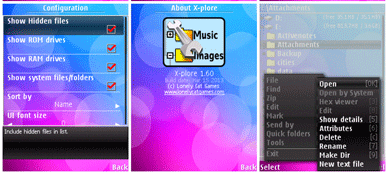
LCG X-plore v1.60(0) S60v3 S60v5 S^3 Anna Belle (Released as freeware). The X-plore is a file manager for mobile phones, with wide range of functions on the file system of your mobile device. X-plore allows you to see inside of your Android phone or tablet.

Dual-pane tree view: X-plore is a dual-pane explorer, which means that there're two folders shown at same time, and common operation such as copying files are done from one pane to another. And X-plore shows folder hierarchy in a tree view. This offers clear orientation on where in file system you currently are, and fast switching to other location. Currently selected folder and files are highlighted, while other folders/files have slightly darker background.

Root access: You may explore internals of the device, and if you're power user and have your device rooted, you can make changes to system data - backup files, remove unwanted applications, etc. Be aware that this possibility can make your device unoperational, requiring reinstall of firmware, but if you've rooted your device, you probably know what you're doing. If you're standard user, you may choose to hide internal memory from view and be sure not to mess with system. You can comfortably see contents of your external memories, either be it built-in high capacity memory, external memory card, or possibly USB memory stick attached to your tablet. All these memory types are listed in main level, you don't need to search for their folders on the device. Where it makes sense, X-plore tries to tell more about the file. This means showing thumbnails for images and video, and displaying basic media information about music files.
Download X-plore v1.60 S60v3v5 S^3 Anna Belle Signed+Unsigned [Full Version]

FTP and FTPS servers: Access to FTP and FTPS (secure FTP) a server is supported. Multiple servers may be configured. All standard file operations can be done on FTP server.

LAN servers: X-plore can display shared folders on other computers in LAN (local area network). The system is also called SMB or Microsoft Windows Network, and can access shared folders on computers connected to LAN, or even remote server if it supports SMB protocol. X-plore can search for available servers, edit and save settings, or manually add server. It's also possible to omit username or password (for security reason) and enter these on demand during connecting to server.

Cloud storage: X-plore can access various web storage servers, and access their files. You need to have account in supported web cloud service, then you can access your files stored online through X-plore.

Picasa albums: X-plore can list images in Picasa albums, download them, create albums, upload and delete photos, edit captions. Picasa web albums are natural choice of image albums on Android, since they're easily accessible with user's Google account already configured on Android device.

Download X-plore v1.60 S60v3v5 S^3 Anna Belle Signed+Unsigned [Full Version]

Operations on files: Main operations are related to managing files and folders - viewing, copying, moving, deleting, compressing to Zip, extracting, renaming, sharing, and more. Main interaction is done by touch screen, clicking on folders or files to open files, or long-click to open context menu which contains options which can be done on particular clicked item, or multiple selected items. Multi-selection allows to do operation on more files at once. Files can be selected by clicking check box. It is also possible to select all files in a folder, or clear selection, by clicking parent folder's check box. Opening file may mean to use one of built-in viewer for most popular file types: images, audio, video and text. Or you may configure X-plore to use system application for opening files, in which case system-predefined application that can open particular file is launched. If there're more such applications, Android shows dialog allowing to choose application for opening the file. X-plore indicates that multiple applications may open the file by displaying small question mark on file's icon. When this is shown, you may expect system dialog for picking application to open the file. Sometimes one application becomes default application for particular file type (for example to listen to mp3). This is Android system feature. However, it may be confusing for user to remove this application to handle opening of given file type. Here X-plore helps by offering menu option to clear the default application handling.

Archives: Archives (currently supported are Zip and Rar) are displayed as other folders. You may open them, see contents, and do standard operations that you'd do on files - rename, delete, copy from/to, etc. You don't feel other difference from normal file system, other than operation may be slower for larger Zip files due to need of recompression. Note: RAR archives support only read-only operations.

SQLite database viewer: X-plore can show SQLite database files (those with .db extension) as expandable list of tables, each table containing list of rows and columns with database entries. The view is read-only, no changes to database are done. This feature can aid to developers to check content of their databases, or allows to curious ones to explore system databases (which works on rooted devices).

Interaction: Additional interaction is possible by button bar, which is between two panes, and is fully configurable. You may put buttons of your desired operations here, and change ordering. Buttons in this bar become enabled or disabled automatically depending on if it is possible to perform given operation. Some operations have different meaning for long-click on button. You may learn what happens for long click in the Button configuration dialog. For example, for Copy operation, normal click initiates copying, and long click initiates moving of files.

Another input comes from configurable keyboard shortcuts. Many android devices are mainly controlled by touch screens, and have minimal buttons or keys. Even on such device, you may assign action to volume keys. And on devices with full hardware keyboard, many operations may be (and are by default) assigned to various keys.

Licensing information: X-plore for Android is offered for free Application must be installed from Android Market, otherwise it won't work; link to Download is on the left bar Lonely Cat Games doesn't take responsibility for damages caused by incorrect use of this application We provide limited technical and customer support for this application

Highlights:
  • Dual-pane tree view
  • Root access (on rooted devices), also allowing changes to read-only files
  • FTP, FTPS, LAN (SMB/Samba) servers
  • Cloud storage access: Google Drive™, Dropbox, Box.net, SkyDrive, SugarSync, Webdav, Yandex
  • Picasa image albums
  • SQLite database explorer (files with .db extension)
  • Seamless work with Zip (as with normal folder)
  • Favorite folders displayable in root
  • Built-in viewers for images, video, audio, text
  • Hex viewer
  • Fast Image viewer with zoom and slide to previous/next images in folder
  • Thumbnails for images and video as well as for various file types (depending on associated application)
  • Ability to clear default application handlers
  • Multi-selection - always available, yet not disturbing
  • Search files in folders (also in archives or in search results)
  • View APK files as ZIP
  • Share - send files by Bluetooth, email, or whatever that device supports
  • Configurable buttons and key shortcuts
  • Hide folders that you don't want to see

Click The Link Below To Download

Mirrors Via TusFiles

Password: rajibkhaja

Tips: Don’t Forget To Comment Below On The Comment Box, Because Your Feedback Will Help Us To Fix If Any Bug Stay Here. Thanks.
Unknown | 04.39 | 0 komentar

Download WinRAR and RAR 5.00 Beta 5 Version Just Released

Written By Unknown on Selasa, 04 Juni 2013 | 03.01

WinRAR and RAR 5.00 Beta 5 Version Just Released

 Downloading Mirrors: Direct Link | Site Link
Supported Language: Chinese | English | Finnish | Russian | Swedish
Must Read The Full Post Before Download & Install


WinRAR and RAR 5.00 Beta Version Just Released on 3rd jun morning, WinRAR is the best archiving utility that fully supports RAR and anything archives and is in a position to take cab, arj, lzh, tar, gz, ace, uue, bz2, jar, iso, 7z, & z archives. The WinRAR RAR systematically makes smaller archives than the competition, saving space and transmission prices.

Latest WinRAR offers a graphic interactive interface utilizing mouse and menus still because the program line interface. WinRAR is simpler to use than several alternative archive's with the inclusion of a special "Wizard" mode that permits instant access to the fundamental archiving functions through an easy question and answer procedure.

WinRAR offers you the advantage of business strength archive encoding victimisation AES (Advanced encoding Standard) with a key of 128 bits. It supports files and archives up to eight,589 billion gigabytes in size. It additionally offers the power to form self-extracting and multivolume archives. With recovery record and recovery volumes, you'll reconstruct even physically broken archives.

Click The Link Below To Download

Tips:Don’t Forget To Comment Below On The Comment Box, Because Your Feedback Will Help Us To Fix If Any Bug Stay Here. Thanks.
Unknown | 03.01 | 0 komentar

Download PowerISO 5.6 Multilanguage Full Version With Keygen

Written By Unknown on Selasa, 28 Mei 2013 | 23.56

Power ISO 5.6 Multilanguage Full Version With Keygen

Power ISO 5.6 Multilanguage Full Version With Keygen

Mirrors via:  TusFiles
Supported Language: English & See Below
Must Read The Full Post Before Download & Install

Latest Power ISO 5.6 Multilanguage Full Version With Keygen is a powerful image processing and file compression tool, which allows you to create, extract, compress, edit and convert ISO/BIN image files, and mount these files with internal virtual drive. And most of all, the compressed files can be used directly without decompressing.

Supported File
  1. Support ISO, BIN, NRG, IMG, DAA, ...
  2. Open, Create, Edit, Extract ISO File...
  3. Compress, Encrypt, Split ISO File...
  4. Integrated with internal Virtual Drive...
Main Features
  • Support almost all CD/DVD-ROM image file formats (ISO, BIN, NRG, IMG, DAA and so on).
  • Note: DAA (Direct-Access-Archive) is an advanced format for image file, which supports some advanced features, such as compression, password protection, and splitting to multiple volumes. It can be handled directly just like other formats, such as ISO, BIN, ...
  • Supports on-the-fly burning.
  • Supports UDF image file.
  • Create image file from hard disk files or CD/DVD-ROM.
  • Edit an existing image file.
  • Can edit and burn Audio CD image file.
  • Extract files and folders from image file.
  • Convert image files between ISO/BIN and other formats.
  • Make bootable image file, get boot information from bootable image file.
  • Make floppy disk image file.
  • Optimize files to save disk space while saving image files.
  • Mount image file with internal virtual drive. Even if the image file is saved as DAA format, the virtual drive can handle that format directly.
  • Support shell integration, such as context menu, Drag and Drop, clipboard...
  • Supports command-line parameters.
  • Can open XBOX image file.
  • Supports multiple languages
Whats New In v5.6?
  • Support burning to multiple drives simultaneously.
  • Support simulation burning.
  • Support viewing drive and disk information.
  • Support searching within image file.
  • Some minor bug fixes and enhancements.
PowerISO 5.6 Multilanguage Full Version With Keygen
PowerISO Screenshot
System requirement
  1. Windows 98 / Window Me / Windows 2000 / Windows XP / Windows 2003 / Windows Vista / Windows 7 / Windows 8 Operating system or Above.
  2. Intel Pentium 166MHz or above.
  3. 64MB memory.
  4. At least 10MB hard disk space.
Language: English, Arabic, Armenian, Belarusian, Bosnian, Bulgarian, Chinese Simplified, Chinese Traditional, Croatian, Czech, Danish, Dutch, Farsi, French, German, Greek, Hungarian, Italian, Japanese, Korean, Lithuanian, Malay, Norsk, Polish, Portuguese, Russian, Serbian, Slovak, Slovenian, Spanish, Swedish, Thai, Turkish, Ukrainian, Vietnamese, Kazakh

Install Notes
  1. Install The App
  2. Use Serial from Txt File or Use Keygen to make a valid serial
  3. Enjoy This Release!!
Click The Link Below To Download
 
Mirrors Via TusFiles
Password: rajibkhaja

Tips: Don’t Forget To Comment Below On The Comment Box, Because Your Feedback Will Help Us To Fix If Any Bug Stay Here. Thanks.
Unknown | 23.56 | 0 komentar

Download EaseUS Partition Master 9.2.1 Full Version Professional Edition

EaseUS Partition Master 9.2.1 Full Version Professional Edition

EaseUS Partition Master 9.2.1 Professional Edition


Supported Language: English
Downloading Mirrors: HugeFiles | BillionUploads | TusFiles
Must Read The Full Post Before Download & Install


EaseUS Partition Master 9.2.1 Full Version Professional Edition is an ALL-IN-ONE partition solution and disk management utility. It allows you to extend partition, especially for system drive, settle low disk space problem, manage disk space easily on MBR and GUID partition table (GPT) disk under 32 bit and 64 bit Windows 2000/ XP/ Vista/ Windows 7 SP1/ Windows 8.

The latest EASEUS Partition Master Technician Edition is the ALL-IN-ONE partition solution and reliable PC/Laptop & Server disk management toolkit. It is designed for IT professional, system administrator, technician and consultant to offer technical services with unlimited usage.

Partition Manager Features
  1. Resize/Move partitions to avoid data loss, like extending NTFS system partition without reboot to maximize PC performance.
  2. New! Support dynamic disk – resize and copy dynamic volume, convert dynamic disk, etc.
  3. New! Safely merge two adjacent partitions into a bigger one without data loss.
  4. Create multiple-partitions, delete partition, or directly delete all partitions.
  5. New! Wipe data on unallocated space.
  6. Wipe disk or wipe partition to permanently wipe sensitive data on disk.
  7. Convert dynamic disk to basic disk and Convert FAT to NTFS file system.
  8. Convert primary partition to logical partition and vice versa: convert a primary volume to logical to create a fifth volume on a disk with 4 existed primary volumes.
  9. Speed up your computer by defragmentation.
  10. Disk surface test to check and find bad sectors and rebuild MBR to boot system again.
  11. Linux partition management: delete, create, format, recover EXT2/EXT3 partition, etc.
  12. Built-in WinPE 3.0 based bootable CD/DVD or Linux based bootable CD/DVD.
  13. Support all hardware RAID, multiple removable storage device, hard disk and GPT disk (support up to 2TB partition on MBR and 4TB size on GPT).
  14. Support under Windows 2000/XP/Vista/Windows 7 SP1 (32 bit & 64 bit).
  15. And more
EaseUS Partition Master 9.2.1 Full Version Professional Edition
Program Screenshot

Additional features:
  • Provide option to shut down the computer after applying any operation.
  • Powerful safety features protect you against system failures while partitioning.
  • Step-by-step wizard walks you through partitioning process.
  • Preview any partitioning tasks before apply to the hard disk.
  • Change cluster size automatically and manually.
  • Undo feature allows you to undo any partition step.
  • Support Windows 2000/XP/2003/Vista/Home Server/2008 R2 SP1/Windows 7 SP1(32 bit and 64 bit).
  • New! Support up to 2 TB partition on MBR disk and 4 TB size on GPT disk.
  • Support up to 32 disks.
  • User-friendly interface.
Disk & Partition Copy Wizard
  • Partition Copy: Fast file-by-file copy to protect your data before any operation.
  • Hard Disk Copy: Easily upgrade/migrate hard drive to backup data as well as no Windows system re-installation required.
  • Dynamic Volume Copy: Safely clone dynamic volume to basic disk and resize dynamic volume indirectly, etc.
  • GPT disk partition copy: back up data on GPT disk.
  • Copy with Resize: Resize (shrink or enlarge) partitions during copy process in order to fit target space.
  • Partition Recovery Wizard
  • Recover deleted or lost partition on unallocated space.
  • Recover lost partition after repartitioned hard drive.
  • Supports FAT, NTFS, EXT2 & EXT3 partition recovery.
  • Two recovery modes in Partition Recovery Wizard: Automatic recovery mode is easy to use and requires minimal effort; Manual recovery mode gives you full control of the recovery process.
Take Advantage
  • Create at least two partitions: one for your Operating System and the other for your data.
  • Copy partition before operating: using the copy wizard before any operation to protect your data.


Click The Link Below To Download

Mirrors Via TusFiles
Mirrors Via HugeFiles
Mirrors Via BillionUploads
Password: rajibkhaja

Tips: Don’t Forget To Comment Below On The Comment Box, Because Your Feedback Will Help Us To Fix If Any Bug Stay Here. Thanks.
Unknown | 22.19 | 0 komentar

Download PowerISO 5.6 Portable

Written By Unknown on Sabtu, 20 April 2013 | 00.25

PowerISO 5.6 Portable


Supported Language: English
Downloading Mirrors: Sharebeast | TusFiles | Zippyshare
Must Read The Full Post Before Download & Install


PowerISO 5.6 Portable is a software that allows you to open or execute files Image as ISO, BIN, NRG, CDI, DAA, MDF, BWI, B5I, LCD, CIF, P01, PDI, NCD, PXI, GI, FCD, VCD and C2D. By using PowerISO 5.6 Portable you can do things like create image files, open, extract, edit, split, mount, burn and convert ISO files. Well now PowerISO version 5.6 is available, those of you who are interested to use this software, please let yuk downloaded.

Program Screenshot


PowerISO 5.6 Portable
Screenshot-1
PowerISO 5.6 Portable
Screenshot-2

Program Features
  1. Support ISO, BIN, NRG, IMG, DAA, ...
  2. Open, Create, Edit, Extract ISO File...
  3. Compress, Encrypt, Split ISO File...
  4. Integrated with internal Virtual Drive...
Main Features:Support almost all CD/DVD-ROM image file formats (ISO, BIN, NRG, IMG, DAA and so on).

Note: DAA (Direct-Access-Archive) is an advanced format for image file, which supports some advanced features, such as compression, password protection, and splitting to multiple volumes. It can be handled directly just like other formats, such as ISO, BIN, ...
  1. Supports on-the-fly burning.
  2. Supports UDF image file.
  3. Create image file from hard disk files or CD/DVD-ROM.
  4. Edit an existing image file.
  5. Can edit and burn Audio CD image file.
  6. Extract files and folders from image file.
  7. Convert image files between ISO/BIN and other formats.
  8. Make bootable image file, get boot information from bootable image file.
  9. Make floppy disk image file.
  10. Optimize files to save disk space while saving image files.
  11. Mount image file with internal virtual drive. Even if the image file is saved as DAA format, the virtual drive can handle that format directly.
  12. Support shell integration, such as context menu, Drag and Drop, clipboard...
  13. Supports command-line parameters.
  14. Can open XBOX image file.
  15. Supports multiple languages
Supported operating systems: 32-bit Windows: Windows 98, Windows Me, Windows 2000, Windows XP, Windows 2003, Windows Vista, Windows 2008, Windows 7 64-bit Windows: Windows XP, Windows 2003, Windows Vista, Windows 2008, Windows 7

Supported languages: English, Arabic, Bulgarian, Chinese Simplified, Chinese Traditional, Croatian, Czech, Danish, Dutch, Farsi, French, German, Greek, Hungarian, Italian, Japanese, Korean, Lithuanian, Norsk, Polish, Portuguese, Russian, Slovenian, Spanish, Swedish, Thai, Turkish, Ukrainian


Click The Link Below To Download

Mirror via Mirrors Via Zippyshare
Mirror via Sharebeast
Mirror via TusFiles

Password: rajibkhaja


Installation

  1. Extract rar
  2. Run PowerISO.exe
  3. Enjoy
Tips:Don’t Forget To Comment Below On The Comment Box, Because Your Feedback Will Help Us To Fix If Any Bug Stay Here. Thanks.
Unknown | 00.25 | 0 komentar

Download WinArchiver 3.2 With Full Keygen

Written By Unknown on Rabu, 17 April 2013 | 11.04

WinArchiver 3.2 With Full Keygen

WinArchiver 3.2 With Full Keygen

Supported Language: English
Downloading Mirrors: Sharebeast | TusFiles | Zippyshare
Must Read The Full Post Before Download & Install

WinArchiver 3.2 With Full Keygen: is a powerful archive utility, which can open, create, and manage archive files. It supports almost all archive formats, including zip, rar, 7z, iso, and other popular formats. WinArchiver can also mount the archive to a virtual drive without extraction.

WinArchiver supports the following file types: .zip (WinZip Files), .rar (WinRAR Files), .7z (7z Files), .mzp (Mountable Archive), .iso (CD/DVD Image File), .001 (7z Sub Volume), .arj, .bz2, .bzip2, .gz, .gzip, .tar, .taz, .tbz, .tbz2, .tgz, .tpz, .cab, .cpio, .deb, .lha, .lzh, .rpm, .split, .swm, .wim (Windows Imaging File), .z, .daa (PowerISO File), .bin, .cue, .mdf, .mds, .ashdisc, .bwi, .b5i, .lcd, .img, .cdi, .cif, .p01, .pdi, .nrg (Nero Disc Image), .ncd, .pxi, .gi, .fcd, .vcd, .c2d, .dmg (Apple Disc Image), .bif, .ima, .flp, .uif (MagicISO File)

MZP is the new archive format supported by WinArchiver. It supports data compression, encryption, and file spanning. WinArchiver can be used to create and manuplate MZP archives. The MZP archive can also be mounted as virtual drive instantly with WinArchiver Virtual Drive, thus you can access files in the archive without extraction. Compared with other archive formats, MZP archives can be mounted more efficiently.

Main Features:

  1. Support almost all popular archive formats.
  2. Open and extract archive files.
  3. Edit existing archives.
  4. Create zip, 7z, iso, mzp archive file from hard disk files.
  5. Support unicode file names.
  6. Mount archive file to a virtual drive without extraction. You can use it as a professional virtual drive software.
  7. Support multivolume, encryption, and archive comments.
  8. Support Windows Explorer shell integration.
  9. Support both 32-bit and 64-bit Windows.


Click The Link Below To Download

Downloading Mirrors Via Zippyshare


Downloading Mirrors Via TusFiles


Downloading Mirrors Via Sharebeast


Password: rajibkhaja

Tips:Don’t Forget To Comment Below On The Comment Box, Because Your Feedback Will Help Us To Fix If Any Bug Stay Here. Thanks.
Unknown | 11.04 | 0 komentar

Download MagicRar Studio 8.7 Build 4.1.2013.8395 Full Keygen

MagicRar Studio 8.7 Build 4.1.2013.8395 Full Keygen
Supported Language: English
Downloading Mirrors: Sharebeast | TusFiles | Zippyshare
Must Read The Full Post Before Download & Install

MagicRar Studio 8.7 Build 4.1.2013.8395 Full Keygen: Drive Press to safely compress your entire disk using proven NTFS compression. Unlike built-in NTFS compression, MagicRAR Drive Press compresses your entire disk even when your edition of Windows wouldn't allow it. Best of all, all your files and settings are preserved and can be accessed normally, as if your drive wasn't compressed. Of course, Drive Press safely decompresses your drive if you want to go back for any reason.

Program Features:

  1. Shell Namespace Extension Technology So Easy it Feels Like Magic!
  2. Find Smallest Archive Benchmark Compression Algorithms
  3. Designed for SSDs Process Multiple Archives Simultaneously
  4. Transparent Full Disk Compression Full Live Access to Your Data
  5. Intelligent Extract to Sub folder Skips Unneeded Folder Creation
  6. Plug-In Extensible: Add Support for New Archive Types
  7. Outlook Add-In Transparent E-mail Attachment Compression 1
  8. Browse Windows XP Mode Files: Navigate and Copy Files from Windows XP Mode Folders
  9. VMware Virtual PC Hard Disks: Browse Inside VMDK and VHD Files without Pre Mounting
  10. Unified 32-64 Bit Installer Automatically Install the Correct Files for Your OS
  11. Recursive Extract Extract Multiple Nested Archives in a Single Pass


Click The Link Below To Download

Downloading Mirrors Via Zippyshare


Downloading Mirrors Via TusFiles


Downloading Mirrors Via Sharebeast


Password: rajibkhaja

Tips:Don’t Forget To Comment Below On The Comment Box, Because Your Feedback Will Help Us To Fix If Any Bug Stay Here. Thanks.
Unknown | 09.20 | 0 komentar

Download 3D PageFlip Standard 2.6.2 Portable Full Version

Written By Unknown on Senin, 08 April 2013 | 05.01

3D PageFlip Standard 2.6.2 Portable

Supported Language: English & All
Downloading Mirrors: Sharebeast | TusFiles | Zippyshare
Must Read The Full Post Before Download & Install


FREE Download 3D PageFlip Standard Full Version - For those of youwho like to read ebooks or comics, this timeRajib Khajawill share a uniquesoftware called 3DPageFlip. This software has the ability toopen or convertPDF files into book form by the time we open, so the PDFfile will be morefun and excitingtime in reading, as page after page of the same in the showlook like abook in general. In addition can be used for PDF files, 3D PageFlip Standard canalso be used to imagefiles / images. fun is not it?


Program Screenshot

3D PageFlip Standard 2.6.2 Portable

Program Features
  1. Convert PDF to flash eBook with 3D page turning effect.
  2. Upload flipbook online to 3DPageFlip Server.
  3. Define page range, convert render engine, page quality and size for imported PDF.
  4. Import PDF with links; import page text for search purpose; import table of content; Detect wide pages.
  5. Customize a pre-loader for flipbook.
  6. Create tale of content according to your PDF content.
  7. Apply a pre-designed template (including 3D panoramic template) or animated scenes.
  8. Export and save settings or projects for future use, record page info to save your multimedia designs.
  9. Define AutoFlip, page thickness, tilt angle and make book auto scale in different Flash containers.
  10. Set Flash buttons display language.
  11. Different kinds of render engine to choose, to avoid distortion for some special PDF files.
  12. Input Presenter information such as name, website address, Email and details info to show in About Window. Define book Title, show logo in 3D eBook.
  13. Choose color for Tool Bar, set background with pure/gradient color or image directly.
  14. SEO and Google Analytics Integrated.
  15. Enable readers to sharing via Facebook, Twitter, iGoogle, etc, Sharing Analytics supported.
  16. Output to different formats: HTML, ZIP, EXE, 3DP, Mobile Version and Burn to CD.
  17. HTML allows you to upload to a website to be viewed online (with title, keywords and other metadata defined).
  18. EXE (with setting title, icon and open window size) and Zip allow you to send to your user by email to be viewed on their computer.
  19. 3DP is a special format for 3D PageFlip Reader – suitable for email sharing.
  20. Mobile version is to output HTML flipbook which can be viewed on mobile devices via Browsers (support slide single pages on mobiles).
  21. Burn to CD allows you to burn to disk so that you can send your user physical media for viewing on their computer.
Output 3D Flash Flipping Book Features
  • Realistic 3D page-flipping effect to read ebooks.
  • Spin flash eBook in 3D panoramic template with 360 degree effect.
  • Click navigational buttons to turn pages.
  • Double-click or click zoom in/out button to zoom in or zoom out pages in multi-level.
  • Manually define Tilt Angle or wheel mouse to change angle to view eBook pages.
  • View pages thumbnails to go to interested page quickly.
  • Flip pages automatically.
  • Turn page-turning sound on/off.
  • View eBook detail information.
  • Share eBook URL via Facebook, Twitter, Digg, etc.
  • Add bookmark on pages as notes for later reading.
  • Print out the whole eBook or a selected range of pages.
  • View page-flipping eBook in full screen.

Click The Link Below To Download

Mirrors Via Zippyshare
Mirror via Sharebeast
Mirror via TusFiles
INFO

Password: rajibkhaja

Tips: Don’t Forget To Comment Below On The Comment Box, Because Your Feedback Will Help Us To Fix If Any Bug Stay Here. Thanks.
Unknown | 05.01 | 0 komentar
previous home